Ride Booking, Widget
The WakePulse booking system brings online booking and daily park operations into a single workflow. A booking can be created by the client via the website or MiniApp, or manually by an admin over the phone, in a chat, or in person.
This module is designed for scheduling, distributing workload across winches and staff, tracking prepayments and final payments, and further activating rides according to the actual rules the park operates by.
Combining live queue and booking
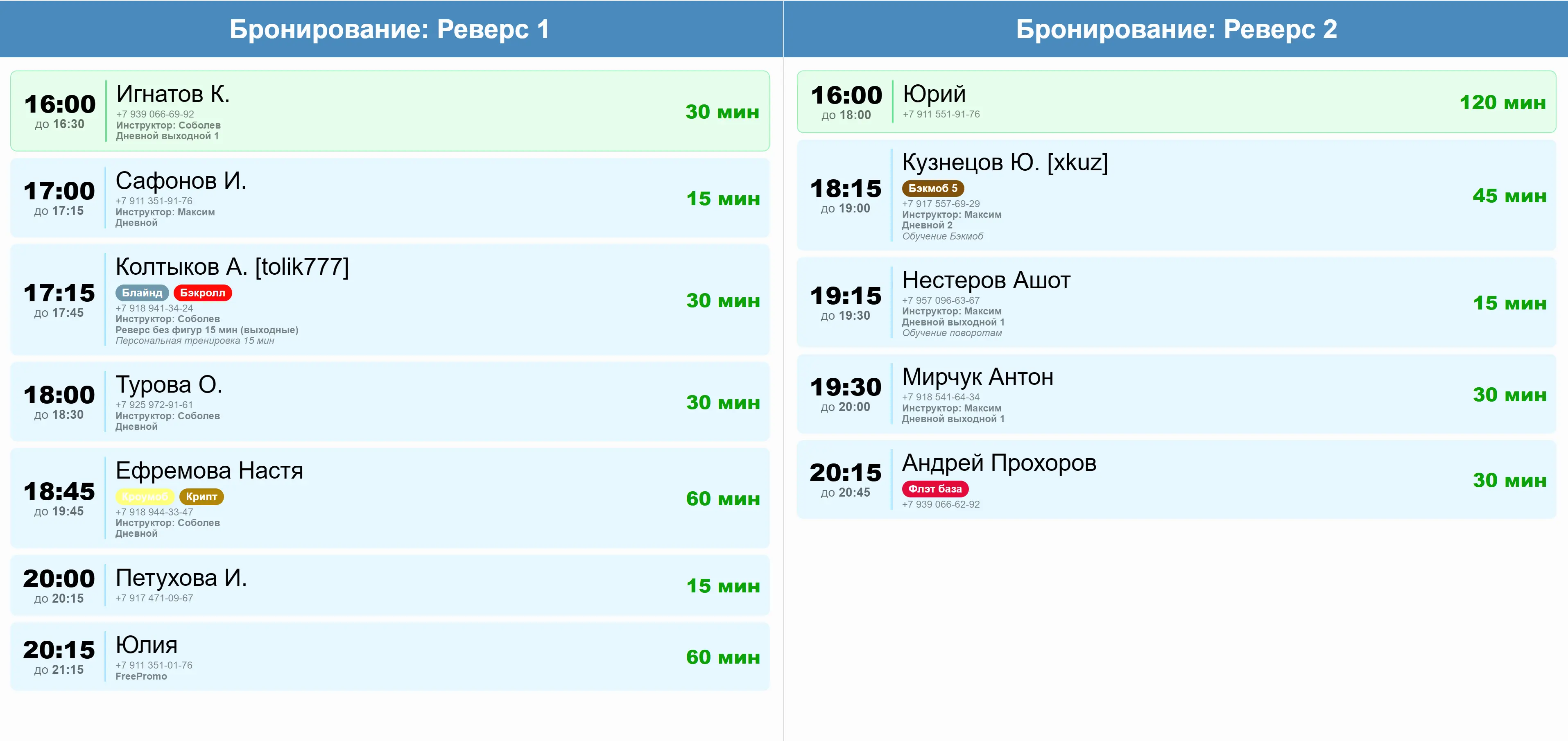
In WakePulse, you can combine a live ride queue with time-based booking. The client books a slot in advance, and at the configured time before the start, the booking appears in the queue monitor as an upcoming reservation.
When the client arrives, they can be placed directly in the correct queue position, which is either preset in the configuration or specified manually by the admin. This ensures the client rides at their scheduled time while other visitors are not surprised by a conflicting reservation because they can see the upcoming booking in advance.
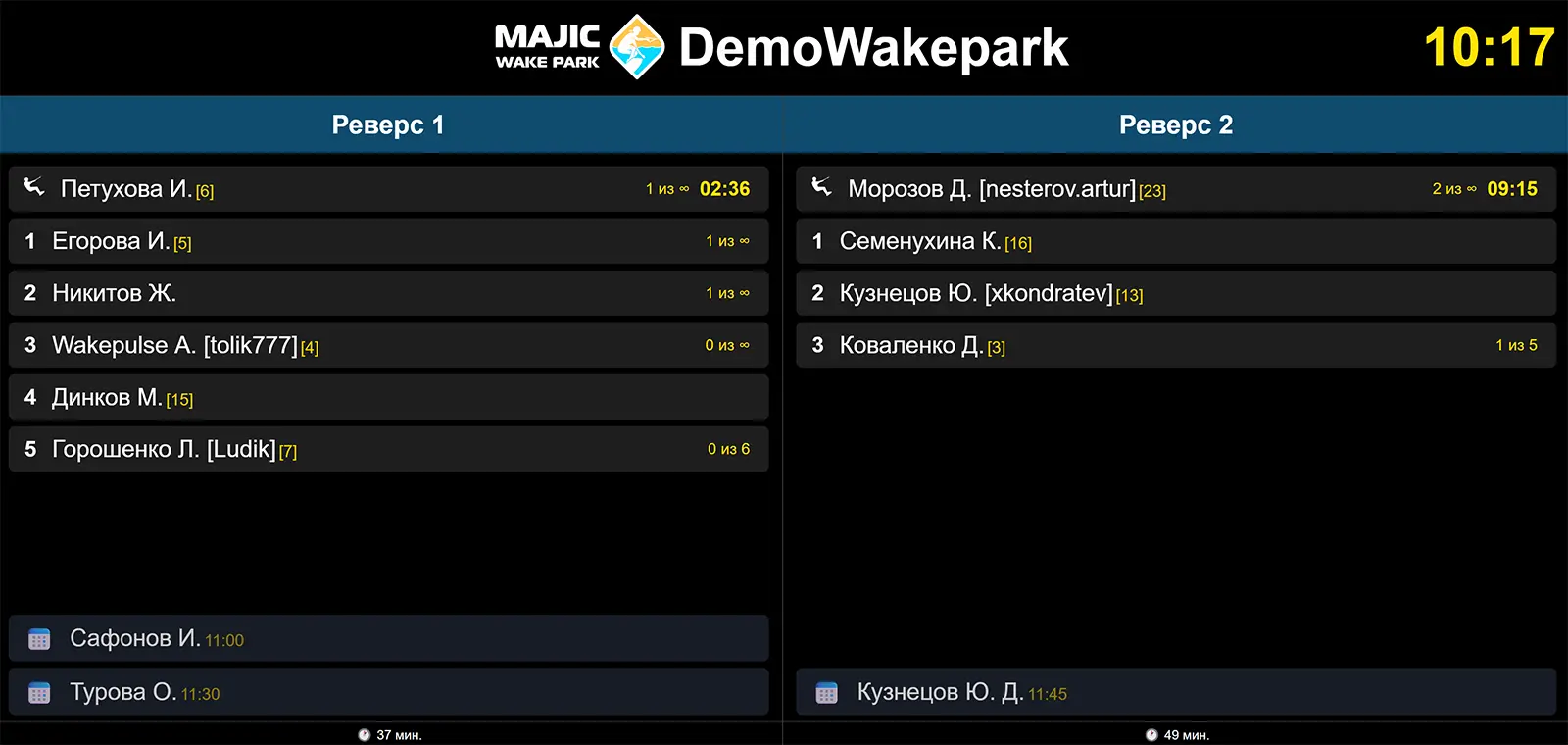
The client can book in the way that suits them best: via the website, a direct link, MiniApp, phone, or through an admin in a chat. The booking history and status remain in one system regardless of the channel.
The CRM helps not only accept the booking but also bring it to the ride: display it in the schedule, distribute workload across staff, manually accept the booking, record prepayments, and close the booking by the required scenario.
What the booking module can do
| Capability | In plain terms |
|---|---|
| Booking available time slots | Free slots can be selected by the client or by the admin if the booking is created manually over the phone or in person. |
| Choosing winch and tariff | The form shows only relevant options so the person does not get confused. |
| Additional services | You can immediately offer rental, training, or other services. |
| Booking with an instructor | If the park uses instructors, the client can choose a specific one or book without an instructor. |
| Booking via MiniApp | The same booking logic is available in the MiniApp: the client can choose a slot, tariff, services, and submit the booking directly from their preferred channel. |
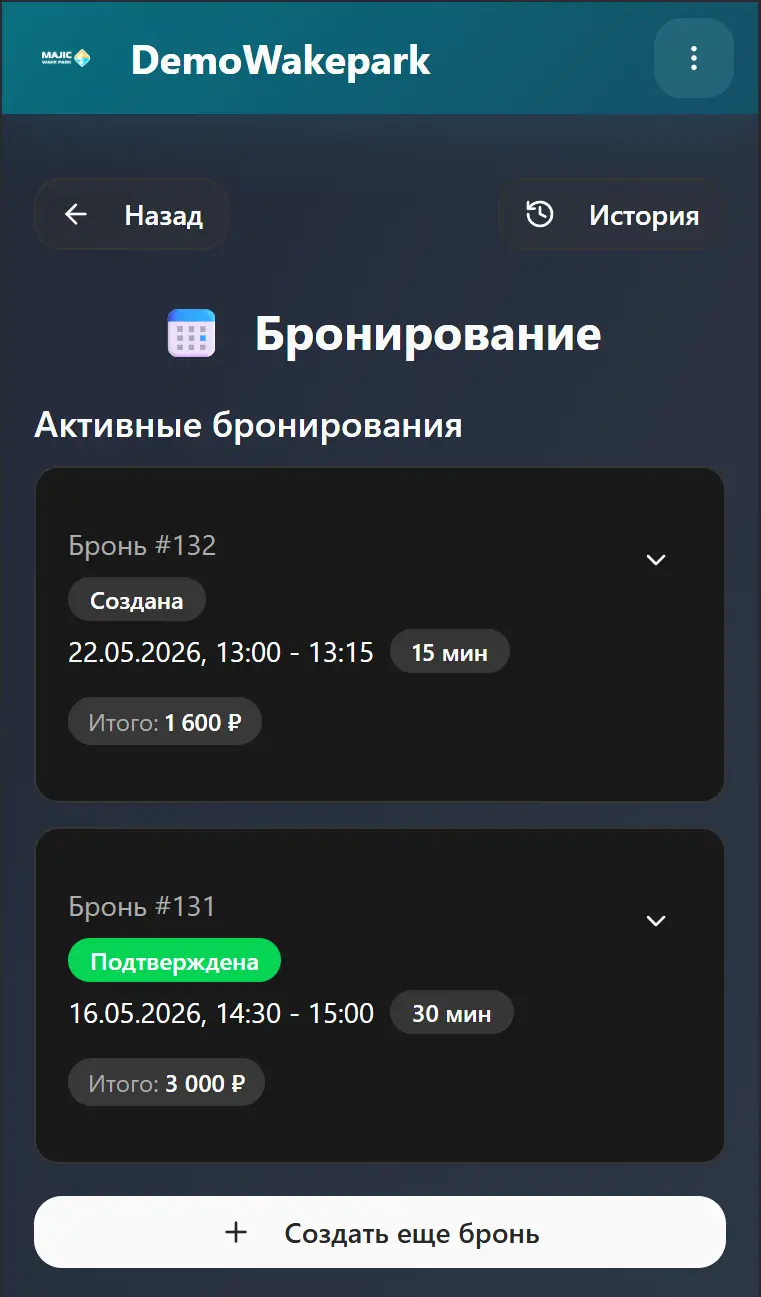
| Booking history | In the MiniApp, the client can view active and past bookings to quickly rebook or check details. |
| Flexible embedding options | The form can be embedded directly into a page, opened via a button, shared as a direct link, or used inside a MiniApp. |
Module settings
In WakePulse, booking is a dedicated operational module where you can manage bookings independently of the incoming channel. The booking module can be disabled if it would clutter the interface.
Within the module, booking rules are configured: how far in advance a booking can be made, which dates are in season, which fields are shown in the form, and how such bookings are subsequently activated inside the CRM.
Commonly configured
- whether booking is enabled at all;
- how many days ahead the booking window is open;
- how many minutes before the slot booking closes;
- whether to show tariff, instructor, additional services, and notes;
- how activation is handled: via queue or via auto-open and close session.
How this is used in practice
The admin can quickly create a booking manually, accept a prepayment, see the remaining balance, and then activate the booking by the required scenario. Client booking channels use the same rules and restrictions, so no conflicting entries appear in the schedule.
How bookings look in CRM
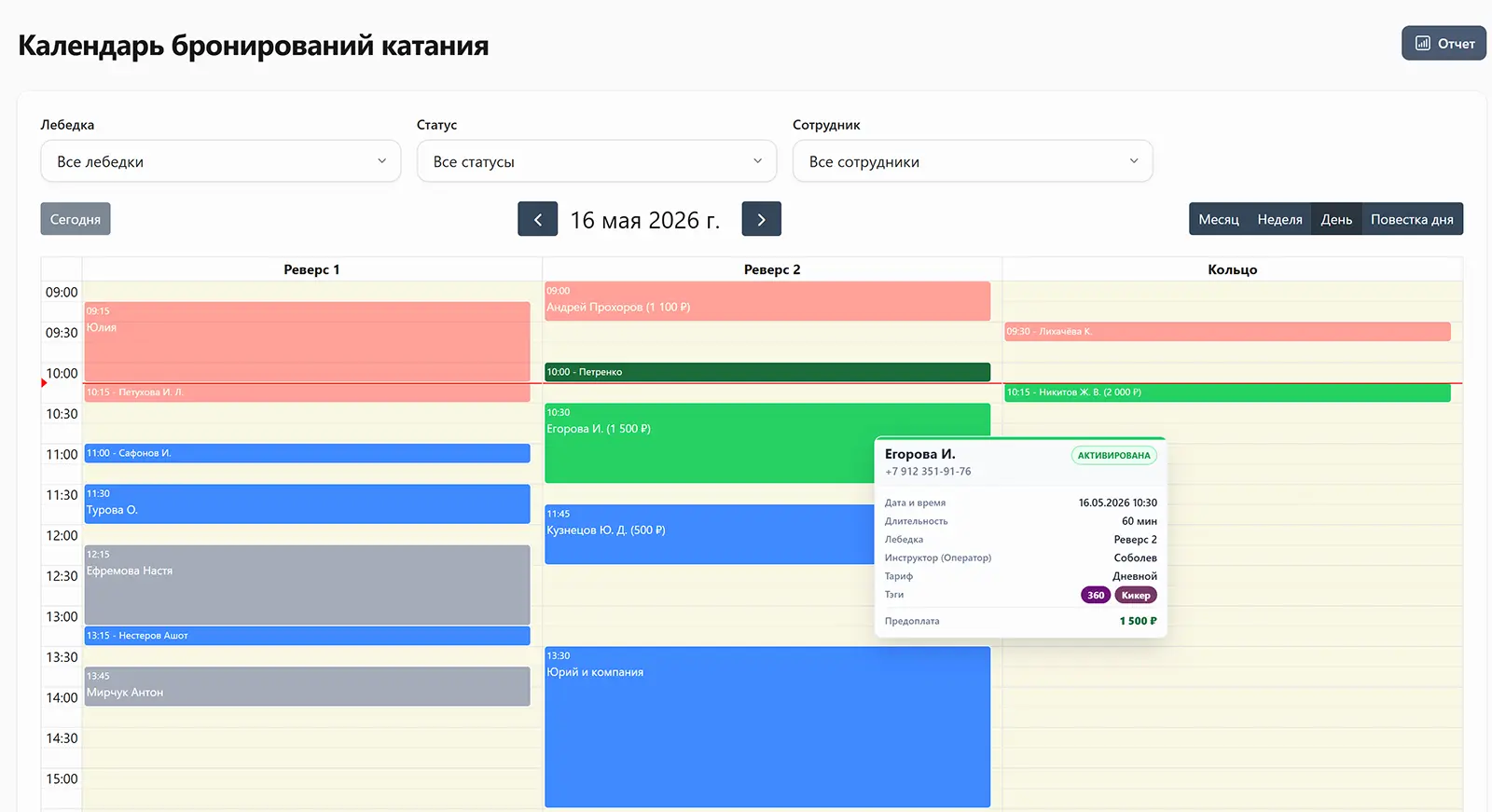
In CRM, a booking immediately enters the park's operational workflow, where the admin sees a shared calendar, staff, payments, and next steps for each entry. If the booking came through the widget or MiniApp, staff can receive an instant notification (internal and via Max/Telegram) about the new booking and quickly respond by taking it into work.
Schedule and calendar
Bookings can be viewed in a schedule layout to quickly assess workload by time, winch, and staff. If the schedule shifts due to delays, cancellations, or changes, bookings can be easily moved by drag-and-drop directly in the calendar.
Full info and notifications
Inside a booking, you can see the client, services, notes, status, prepayments, remaining balance, and next steps for activation or cancellation. It is also easy to track which staff member has already seen the new booking and who needs to respond first.
Staff workload
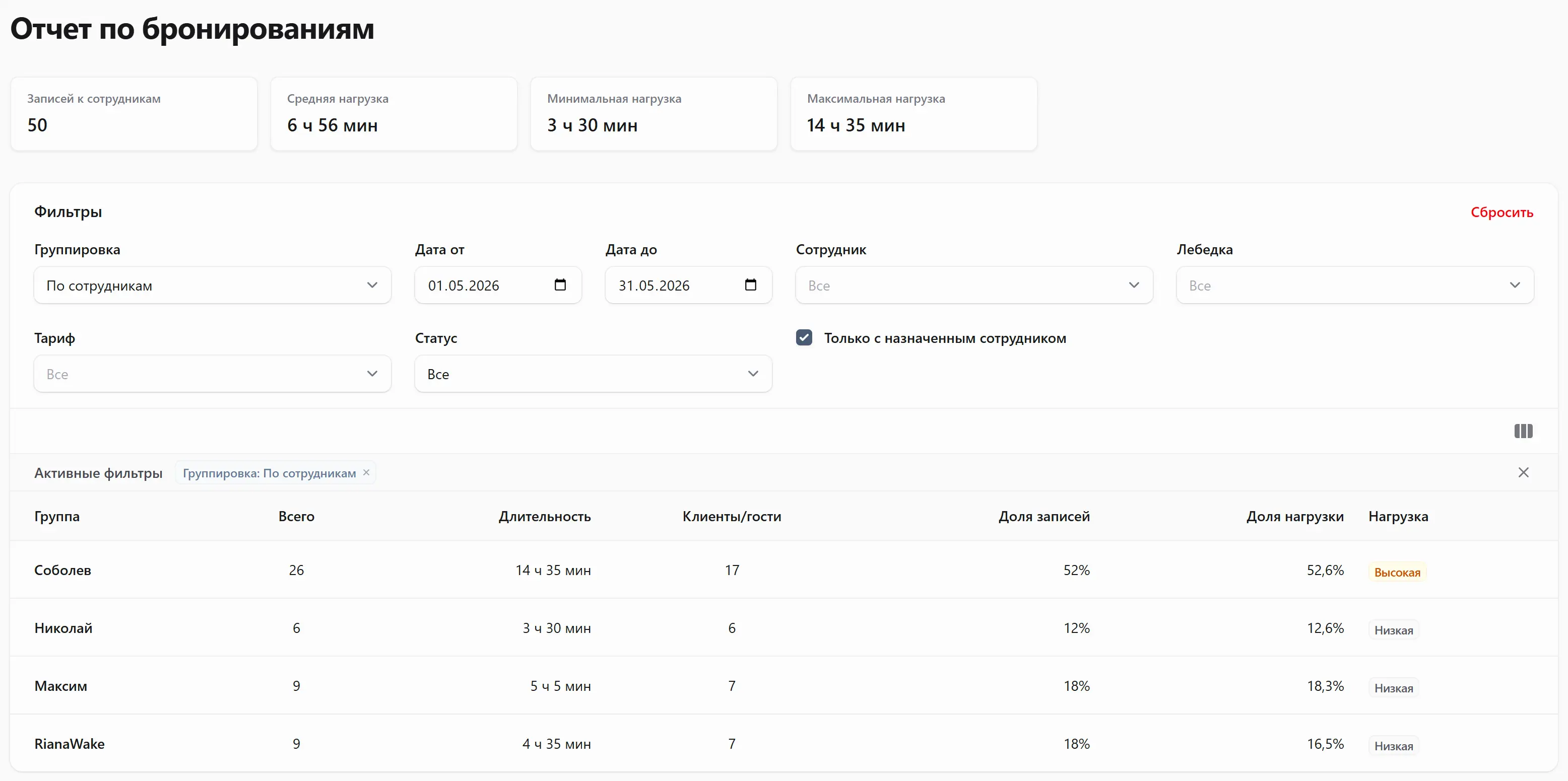
If the park works with instructors and winch operators, the CRM helps view their workload and evenly distribute bookings among them. When creating a booking, the admin can also see the number of bookings and hours worked by each operator (instructor).
Different booking activation modes
Different parks manage ride tracking in different ways. That is why WakePulse lets you choose the scenario that best matches your actual workflow.
Classic activation with wake session opening
Upon activation, the system opens a wake session and then follows the park's classic workflow by placing the client in the ride queue.
Auto-open and close session
If the park operates only by booking (without a queue), you can use a scenario where after activation and payment the system automatically opens and closes the session without extra manual steps.
Thus, a wakepark can manage bookings through a regular queue or use booking as a fully self-contained service scenario.
Prepayments, payments, and no-shows
WakePulse booking accounts not only for the booking itself but also for the financial side. This is especially important when a booking reserves a limited resource and affects park revenue.
Prepayment tracking
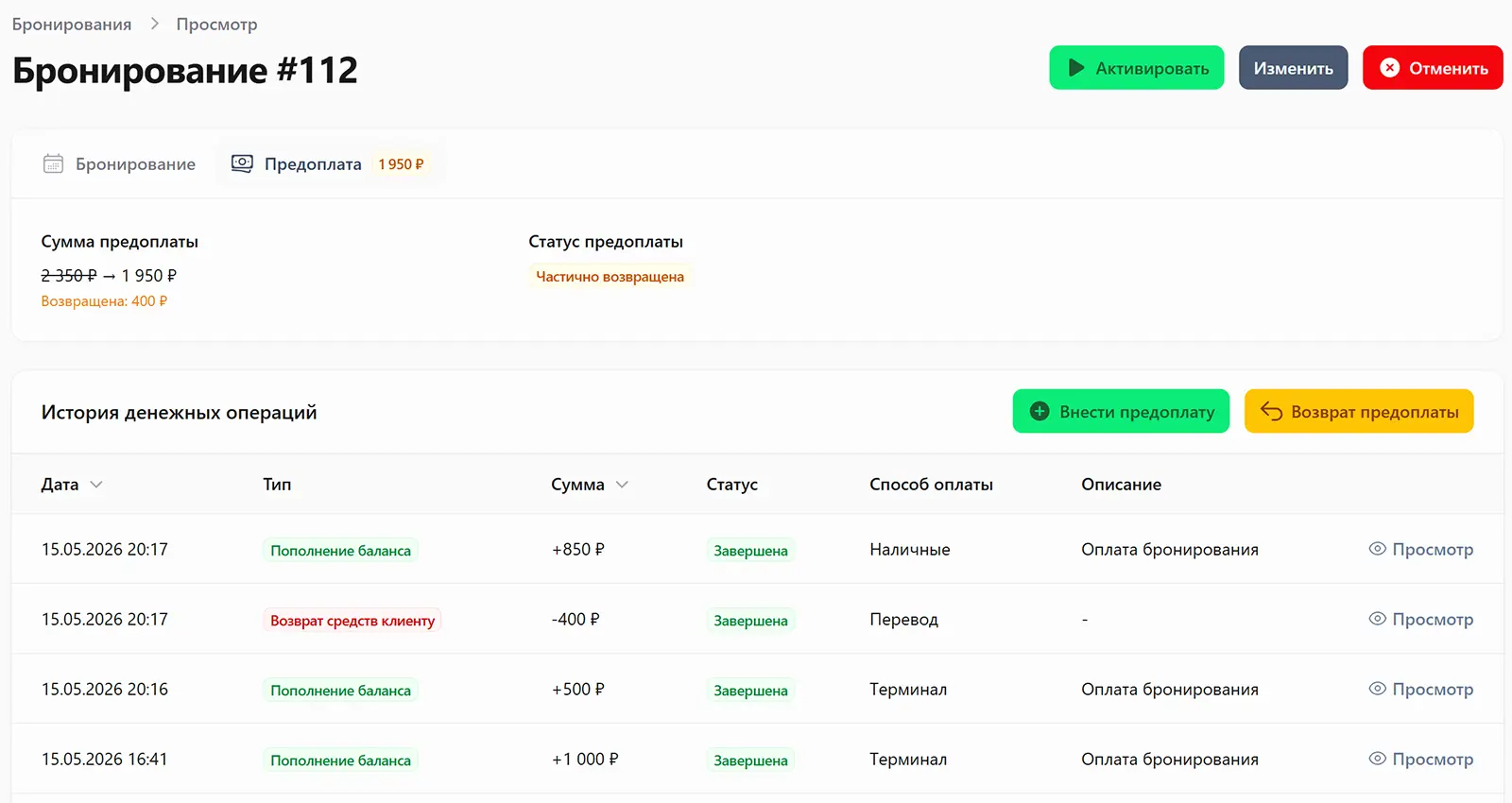
A prepayment can be recorded for a booking, and you can see its status and understand how much has already been paid and how much remains to be paid.
Additional and final payments
The CRM keeps the full payment picture: prepayment, balance, overpayment, and next steps upon activation or closure of the booking.
No-show settings
You can set rules for when a booking is considered a no-show, after how many minutes the status changes automatically, and whether the prepayment should be forfeited when the client does not show up.
Available modes and settings
The booking form and widget can be flexibly configured. This is convenient because one park may only need a name and phone number, while another needs to specify tariff, winch, duration, instructor, and additional parameters right away, and then neatly embed the form into an existing website.
What can be shown in the form
- client name and phone;
- date and time;
- winch and tariff;
- additional services and instructor;
- duration, promo code, and notes.
What can be configured for the widget
- form display mode;
- language and theme;
- widget width;
- button text;
- panel or button side.
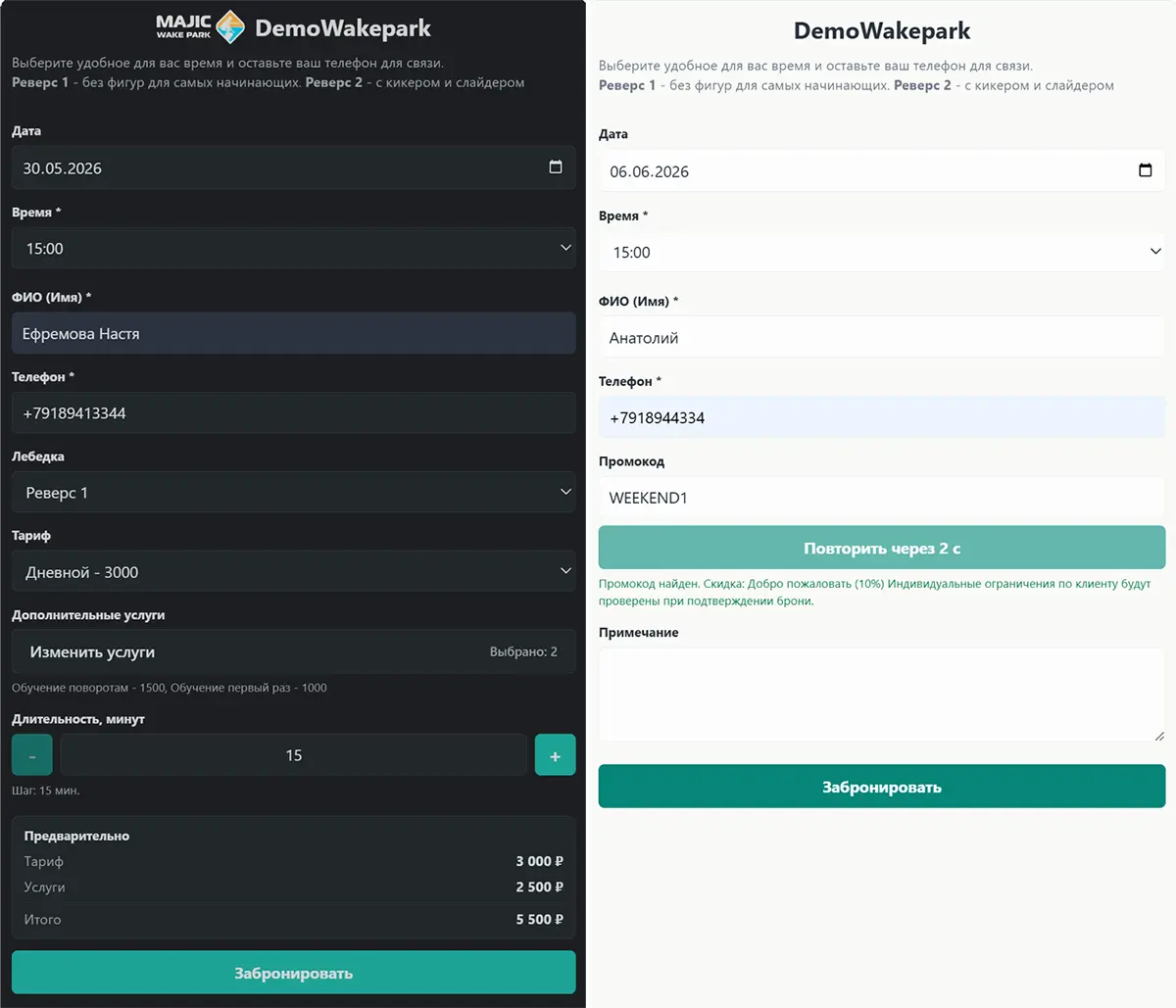
The booking widget can be displayed in different ways. This lets you choose the format for a specific website without changing the booking logic itself.
Embed into a page
The form is visible directly on the page. This option works well for a dedicated booking page.
Floating panel
The form is open on the side and always stays on screen. This is a noticeable option if booking should always be at hand.
Button with form opening
Only a button is shown on the site, and the form opens on click. This is the most familiar format for many clients.
Booking with an instructor and notifications
If the park offers booking with an instructor, the instructor can be selected in the public form or specified manually when the admin creates the booking. This is especially convenient when trainers have different schedules or when the visitor wants a specific person.
For the client
The client immediately knows who they are booking with, and during manual booking the admin can quickly assign the right staff member. The system prevents time conflicts.
For the instructor
Instructors can be set up to receive new booking notifications in Telegram or MAX. This way they see the booking faster and can prepare in advance. One instructor can serve multiple wakeparks.
Queue and booking monitors
Monitors do not require authorization and are accessible via a direct link, meaning they can be displayed on any device with a web browser: tablet, TV, smartphone, etc. A monitor can show the current queue for park visitors, or be used for staff: a booking monitor, a monitor for bookings assigned to a specific staff member, or a combination of booking and winch queue.
Booking via website and MiniApp
The website widget and MiniApp use the same booking interface and the same business logic as the CRM, so the park gets a unified schedule without manual data transfer between channels.
Website widget
Works well for a dedicated booking page, a "Book now" button, or a direct link from ads, social media, and admin messages.
MiniApp
This is the same booking interface but tied to the client. In the MiniApp, the client can additionally view booking history, statuses, and active reservations.
When a direct link works best
A direct link is especially convenient when you want to send someone straight to the form without embedding it into a website. For example, such a link can be placed in a profile header, a manager's message, a Telegram channel, or an ad button.
Try it in the demo park
Log in to the demo wakepark and try creating a booking from the website widget or from any MiniApp: Telegram, VK, or MAX. This makes it easier to check the full client journey and see how a new booking appears in the CRM.
WakePulse Demo Park
Demo version


WakePulse and YClients: what is the difference
From a wakepark's perspective, the difference is usually that WakePulse is built around ride processes from the ground up, while YClients is a more universal online booking system for various industries.
| Comparison | WakePulse | YClients |
|---|---|---|
| Start without payment | WakePulse website has a free tier where the booking module is already available. | Starter access conditions and trial period depend on current YClients tariffs. |
| Specialization | The system is tailored for wakeparks: winches, ride tariffs, instructors, additional services, and further booking workflow inside the park. | The service is designed for a wide range of businesses and is not specifically focused on wakeparks. |
| Booking form | The form is built around ride logic: time, winch, tariff, instructor, duration, and services. | Strong universal online booking with a widget, button, and ready-made website embedding options. |
| What happens after booking | The booking is immediately connected to internal park processes and lives in one system with the rest of operational work. | The main focus is on booking, scheduling, and general client service. |